


Website or App? Yes! The hacky guide to building sites with Expo Router
The routing part was easy. The fake phone in the browser was not.
Written in April 25, 2026 - 🕒 11 min. readOne of the annoying little side quests of shipping an app is that Google occasionally forces you to become a website owner too.
Back when I first wrote about Musclog in 2024, the website mostly existed because Google wanted it to exist. I needed the privacy policy, the public pages, the whole respectable app developer starter pack, so I quickly spun up a small Next.js site, got the app approved, and moved on with my life.
That worked right until I had to touch the website again.
New screenshots? Other repo. New feature copy? Other repo. Legal page update? Other repo. Translation tweak? Other repo.
None of that was actually hard, which almost made it worse. It was just annoying enough to keep reminding me that I had split one product into two codebases for a reason I no longer respected.
So now I don’t.
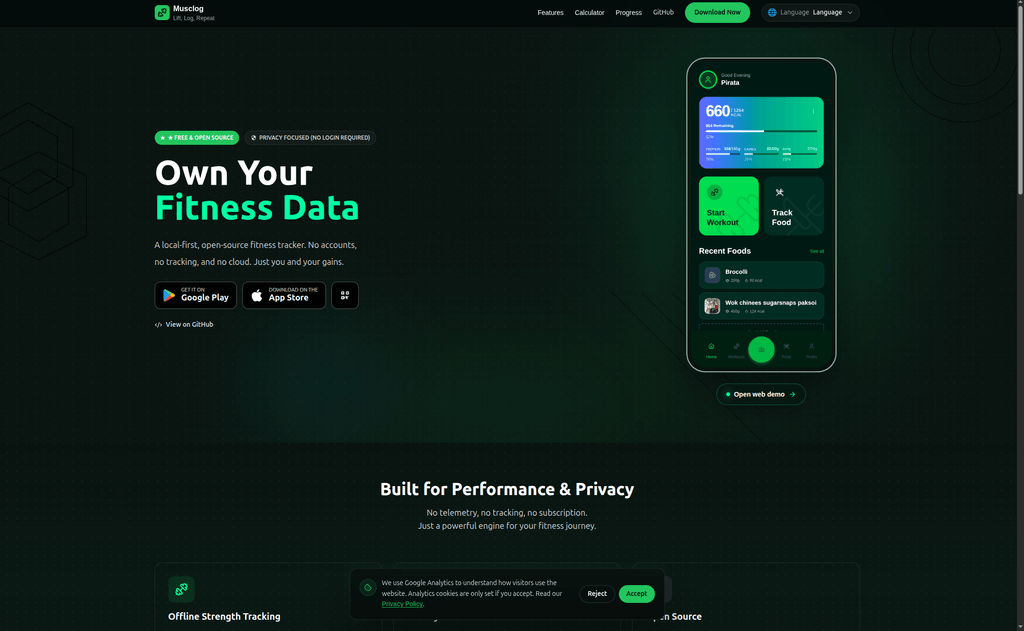
Musclog’s website lives inside the app repo. Same Expo Router project. Same deploy. musclog.app is the public site, musclog.app/app is the actual web app, and Android + iOS still come from the same codebase.
Best practice? Questionable. Convenient? Extremely.
Ok but why?
Basically because Expo Router removed my last excuse.
Musclog already used Expo Router, so the app was already organized as file-based routes inside app/. Then I realized I could just create a route group called (website), move the public pages there, keep the actual app under app/app/*, and stop pretending these were two different products.
The separate repo had become one of those architecture decisions that sounds clean in theory and then quietly charges you maintenance tax forever:
- two PRs for one product change
- two deployments
- two places for translations
- two places for legal pages
- two places to forget something
No thanks.
The split
The funny part is that the routing itself ended up being the least cursed part of the whole thing:
app/app/*is the actual Musclog app. Workouts, nutrition, AI coach, all of it.app/(website)/*is the public website. Landing page, privacy policy, terms, contact page, calculator.
The root route just checks the platform and sends you where you belong:
// app/index.tsx
import { Redirect, useRouter } from 'expo-router';
import { useEffect } from 'react';
import { Platform } from 'react-native';

export default function Index() {
  const router = useRouter();

  useEffect(() => {
    if (Platform.OS === 'web') {
      router.replace('/home');
    }
  }, [router]);

  if (Platform.OS === 'web') {
    return null;
  }

  return <Redirect href="/app" />;
}
That’s it. On web, / becomes the website. On native, / becomes the app.
The website also gets its own lighter layout:
// app/(website)/_layout.web.tsx
import { Slot } from 'expo-router';

import { WebsiteChrome } from '@/components/website/WebsiteChrome';
import { WebsiteProviders } from '@/components/website/WebsiteProviders';

export default function WebsiteLayout() {
  return (
    <WebsiteProviders>
      <WebsiteChrome>
        <Slot />
      </WebsiteChrome>
    </WebsiteProviders>
  );
}
That matters because the real app layout had already grown into an actual app layout. Database boot, migrations, React Query, safe area, gestures, modals, snackbars, camera, coach context, all the usual “small side project” lies. The website does not need any of that just to explain what the app does.
And if a native user somehow lands on a website-only route, the fix is beautifully blunt:
// app/(website)/home.tsx
import { Redirect } from 'expo-router';

export default function Home() {
  return <Redirect href="/app" />;
}
Done. Back to your macros.
The desktop phone nonsense
This is where I stopped behaving like a normal person.
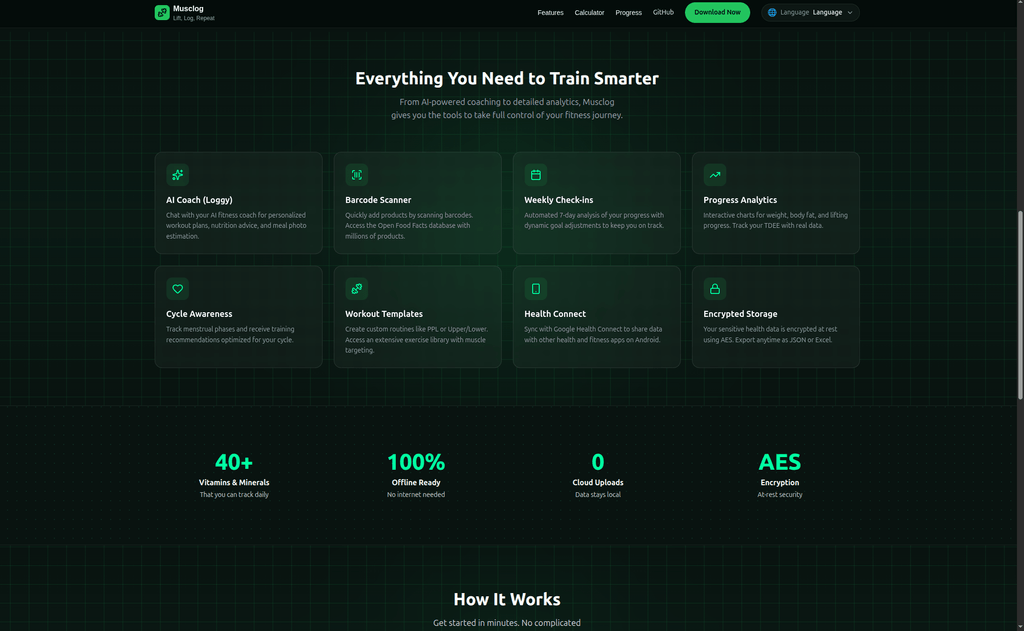
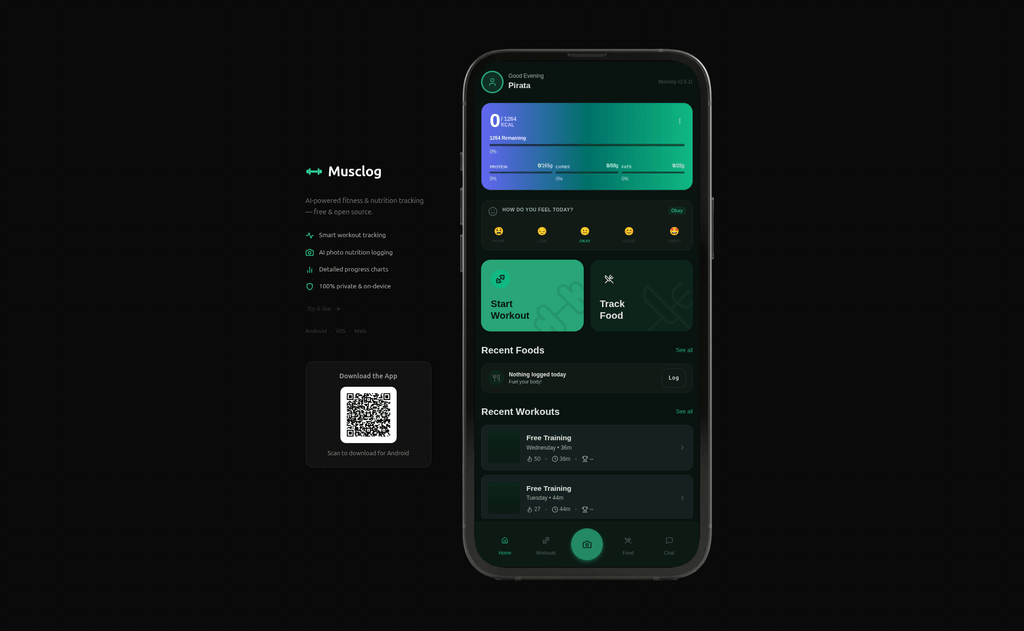
I wanted musclog.app/app on desktop to show the actual working app inside a phone frame. Partly because it looks nice. Partly because it doubles as a product preview. Mostly because once the idea entered my head, every less ridiculous option started feeling wrong.
The annoying detail was that /app should look like a phone, but /home absolutely should not. So routing alone was not enough. I needed the raw HTML shell to know, before hydration, whether the browser should render the fake phone wrapper or not.
That logic lives in app/+html.tsx, inside a script in the document <head>:
function landingPanelGate(base: string) {
  try {
    function update() {
      const raw = window.location.pathname;
      const path = (base && raw.startsWith(base) ? raw.slice(base.length) : raw) || '/';

      if (!path.startsWith('/app')) {
        document.documentElement.classList.add('hide-desktop-wrapper');
      } else {
        document.documentElement.classList.remove('hide-desktop-wrapper');
      }
    }

    update();
    window.addEventListener('popstate', update);

    const origPush = history.pushState.bind(history);
    history.pushState = function (...args) {
      origPush(...args);
      update();
    };

    const origReplace = history.replaceState.bind(history);
    history.replaceState = function (...args) {
      origReplace(...args);
      update();
    };
  } catch (_) {}
}
The important part is the pushState / replaceState monkey patch. First paint was easy. Client-side navigation was the annoying bit. Without this, you could leave /app and keep the wrong shell around like Chrome had forgotten what page it was on.
The HTML shell itself is basically the landing panel, the routed app, and the phone frame:
<body className="expo-web-body">
  <div className="expo-web-landing">...</div>
  <script dangerouslySetInnerHTML={{ __html: LANDING_I18N_SCRIPT }} />
  <div className="expo-web-root">
    <div className="expo-web-app-shell">{children}</div>
    <img
      className="expo-web-phone-frame"
      src={withExpoBaseUrl(PHONE_FRAME_SRC)}
      alt=""
      aria-hidden
    />
  </div>
</body>
Then CSS commits the crime:
@media (min-width: 1024px) {
  .expo-web-root {
    --frame-h: min(100dvh, max(min(360px, 100dvh), 85dvh));
    aspect-ratio: 1438 / 2976;
    width: min(100vw, calc(var(--frame-h) * 1438 / 2976));
    max-height: var(--frame-h);
    overflow: hidden;
  }

  .expo-web-app-shell {
    position: absolute;
    left: 7.4409%;
    top: 2.9906%;
    right: 6.3282%;
    bottom: 3.125%;
    zoom: 0.85;
  }
}
Yes, I measured the transparent screen area inside the PNG until the app lined up correctly. There is no elegant geometry behind those percentages. It was just me, a phone bezel, and a lot of nudging until the app stopped looking crooked.
On routes that are not /app, the whole performance gets disabled:
.hide-desktop-wrapper .expo-web-landing,
.hide-desktop-wrapper .expo-web-phone-frame {
  display: none !important;
}

.hide-desktop-wrapper .expo-web-app-shell {
  position: static !important;
  width: 100% !important;
  height: auto !important;
  zoom: 1 !important;
  overflow: visible !important;
}
Yes, it uses !important. This is pre-hydration CSS whose entire job is keeping the lie intact. We are not doing refined architecture at this layer.
Three tiny crimes

Once the shell worked, the smaller annoyances started lining up like they had booked appointments.
1. The landing panel needed i18n before hydration
The text beside the phone frame lives in raw HTML, which means React and i18n are still sleeping when the page first renders. So if I wanted a Portuguese page to not flash English first, I had to patch it myself from localStorage:
function landingI18nPatcher(translations, storageKey) {
  try {
    let lang = localStorage.getItem(storageKey);
    let s = (lang && translations[lang]) || translations['en-US'];

    document.querySelectorAll('[data-landing-i18n]').forEach(function (el) {
      let k = el.getAttribute('data-landing-i18n');
      if (k && s[k]) {
        el.textContent = s[k];
      }
    });
  } catch (_) {}
}
Not elegant. Also not flash-banging a Portuguese page with English text, so I’m keeping it.
2. Raw HTML assets do not get Expo’s usual help
The phone frame PNG and QR code are referenced from raw HTML too, which means Expo’s usual asset niceness does not really help me there. So I needed a helper for base URLs:
function withExpoBaseUrl(path: string): string {
  const base = process.env.EXPO_BASE_URL;
  if (base == null || base === '') {
    return path;
  }

  const basePath = String(base).replace(/^\/+|\/+$/g, '');
  const normalized = path.startsWith('/') ? path : `/${path}`;
  return `/${basePath}${normalized}`;
}
And because those files live outside the React Native asset pipeline, I copy them into public/ before dev and export. Forget that step once and the site immediately reminds you who is in charge.
3. expo export occasionally needed emotional support
In some environments, expo export --platform web would successfully finish and then just stay alive for no reason. Dist folder there. Files generated. Process spiritually complete, technically still hanging around.
So now there is a wrapper script:
// scripts/export-web-wrapper.js
if (output.includes('Exported: dist')) {
  console.log('[export-web-wrapper] Detected successful export. Forcing exit in 5s...');
  setTimeout(() => process.exit(0), 5000);
}
Not glamorous. Very effective.
Then modals got weird
Of course they did.
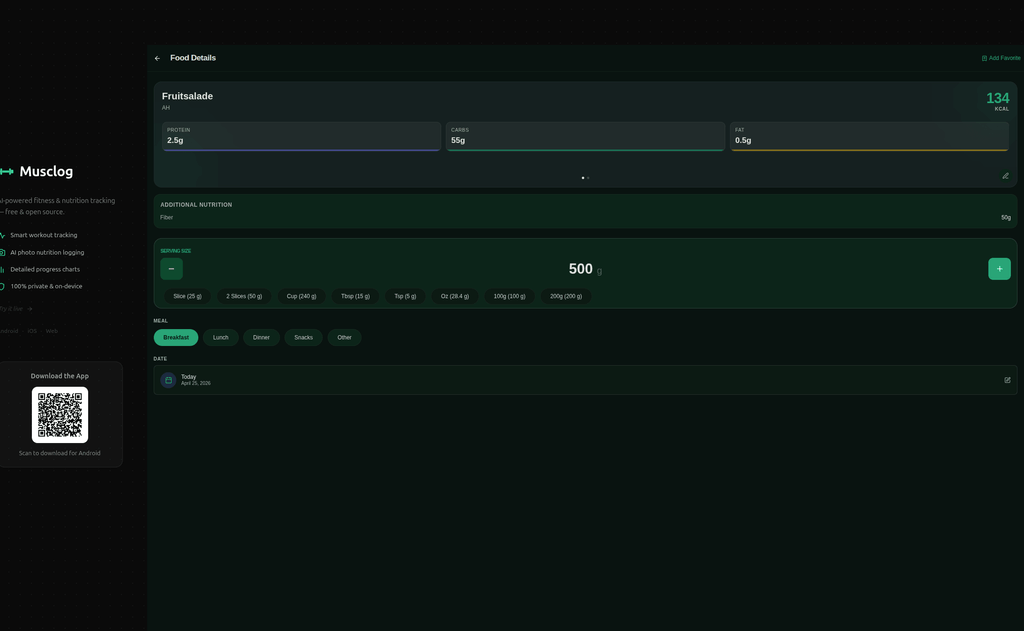
When the web app lives inside a fake phone on desktop, React Native Web’s default Modal behavior starts looking ridiculous very quickly. Portaling straight to document.body is fine when the whole app owns the page. It is much less fine when the app is visually clipped inside a phone shell and the modal suddenly decides it belongs to the whole browser window instead.
So I added a WebModalShellProvider high in app/app/_layout.tsx, with an overlay host inside the phone shell:
// context/WebModalShellContext.web.tsx
return (
  <WebModalShellContext.Provider value={{ hostElement }}>
    <View style={{ flex: 1, minHeight: 0, height: '100%', width: '100%', position: 'relative' }}>
      <View style={{ flex: 1, minHeight: 0, height: '100%', width: '100%' }} collapsable={false}>
        {children}
      </View>
      <View
        id="expo-web-modal-shell-host"
        ref={setHostRef}
        collapsable={false}
        style={{
          position: 'absolute',
          left: 0,
          right: 0,
          top: 0,
          bottom: 0,
          zIndex: 1_000_000,
        }}
      />
    </View>
  </WebModalShellContext.Provider>
);
Then Modal.web.tsx does the obvious-not-obvious thing and switches between a portal inside that host and the normal RN modal:
const useShellPortal = Platform.OS === 'web' && isDesktopFrame && hostElement != null;

if (useShellPortal) {
  return createPortal(
    <View
      style={{
        position: 'absolute',
        left: 0,
        right: 0,
        top: 0,
        bottom: 0,
        width: '100%',
        height: '100%',
      }}
    >
      {children}
    </View>,
    hostElement
  );
}

return <RNModal visible={visible}>{children}</RNModal>;
And the shared overlay hook knows whether it should behave like a full viewport modal or a fake-phone viewport modal:
export function useWebModalLayerStyle(options = {}) {
  const isDesktopFrame = useWebDesktopPhoneFrame();

  if (isDesktopFrame) {
    return {
      position: 'absolute',
      top: 0,
      left: 0,
      right: 0,
      bottom: 0,
      width: '100%',
      height: '100%',
    };
  }

  return {
    position: 'fixed',
    top: 0,
    left: 0,
    right: 0,
    bottom: 0,
    width: '100vw',
    height: '100dvh',
  };
}
That fixed the visual part. Then pointer events decided they wanted attention too.
On native, pointerEvents="box-none" is normal. On HTML, that turns into pointer-events: box-none, which is not real CSS, which means the browser gets to improvise. So there is now a defensive rule for the overlay host:
.expo-web-app-shell #expo-web-modal-shell-host {
  pointer-events: none !important;
}

.expo-web-app-shell #expo-web-modal-shell-host * {
  pointer-events: auto !important;
}
There is also a useLayoutEffect forcing the same thing inline, because by that point I was no longer interested in finding out how polite the correct solution was.
Look, I have a type
If you’ve been reading this blog for a while, none of this should surprise you.
I already turned this blog into a top-down RPG because the Konami Code deserved a bigger payoff than just a background effect.
Then I added Stories to the blog because my internet provider’s app had Stories, and something about that annoyed me deeply enough that I made it everybody else’s problem.
So yes, of course my fitness app now ships its website from the same Expo Router repo, and of course the desktop web app runs inside a giant picture of a phone. This is not a surprising escalation. This is just continuity.
Why I’m keeping it
Past the comedy value, this fixed a very real maintenance tax.
Translations are shared. Design tokens are shared. Components are shared. Legal pages live next to the product they are legally defending. When I change copy, screenshots, or feature positioning, I don’t need to remember which repo holds the respectable public version of the same app.
Deploy also got nicer. One build. One export. One artifact. The website and the web app cannot drift apart unless I deliberately make them drift apart, which is much harder when they are literally shipped together.
And when I shipped the Musclog redesign, the website basically came along for the ride. Same spacing tokens, same colors, updated screenshots, same PR. Exactly the kind of boring maintenance win that makes a slightly weird architecture decision feel smart six months later.
Conclusion
Could I have kept the website in a separate Next.js repo like a more emotionally stable person? Sure.
Was I ever going to keep doing that once Expo Router made this possible? No.
The funny part is that the routing was the boring part. Expo Router handled that just fine. The annoying work lived in all the little browser lies around it: route gating before hydration, raw HTML i18n, asset syncing, shell-aware modals, pointer-event weirdness, and convincing desktop Chrome to temporarily believe it was a phone.
Still worth it.
If you want to poke around the code, Musclog is open-source on GitHub. If you want to use it, it’s at musclog.app. The website lives in the app repo now.
Everybody lives here now.
Tags:
Related posts
Post a comment
Comments
No comments yet.