

Musclog: Redesign nutrition tracking and why your fitness app subscription is a scam
New UI, real food databases, and a rant about fitness app subscriptions I've been sitting on for two years
Written in March 22, 2026 - 🕒 27 min. readPicture this: you’re in the gym. You’re between sets. You’re sweating. You have about 90 seconds before you need to grab the bar again, and you’re standing there poking at your own app like someone’s dad trying to navigate a website from 2008. Four taps to log a single set. Four taps. In an app you wrote. That you could change. And somehow, every single time, you do the four taps because there’s always something else to build first.
That was Musclog. My fitness tracker. My “300 hours I’ll never get back” project that I wrote about back in 2024. It worked. My friends used it. I tracked every workout and every gram of food for months.
It was also, objectively, one of the ugliest apps I had ever put on a phone.
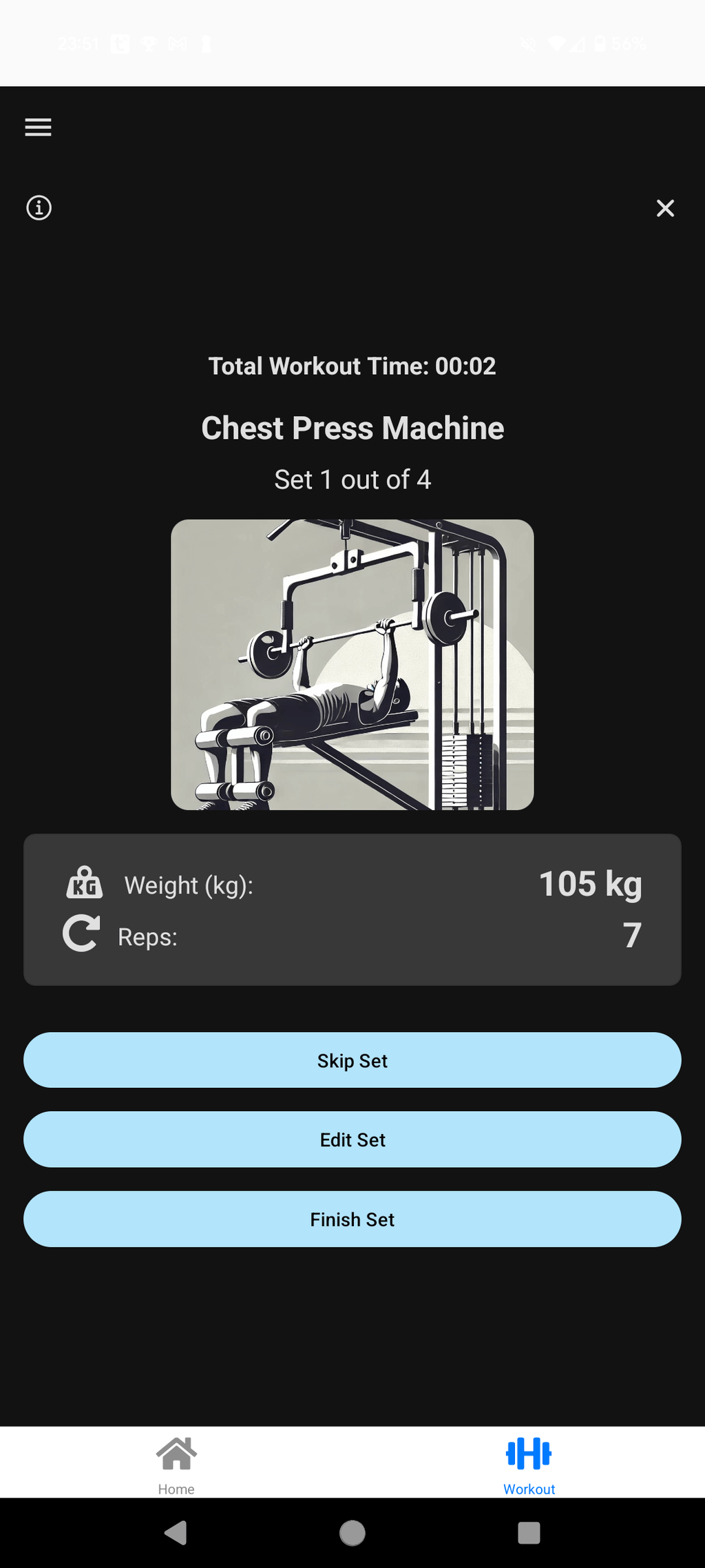
I knew it. My friends knew it. The one friend honest enough to say “dude, this looks like a website” knew it and said it to my face with zero hesitation. But it worked, and for a while that was enough. “It works” is the developer’s equivalent of “it’s fine” - technically true, emotionally a complete lie you’ve agreed to live with.
Then the UX debt started compound-interesting its way into my life. Logging a workout felt like filing paperwork. Adding food required jumping between three different screens when it should have been one. Navigating the app in the gym, already sweating and under a time constraint, was an exercise in friction I had accidentally designed myself. I kept adding features on top of this visual chaos, which is a great way to make a hoarder’s house even harder to navigate. And not to mention the bugs, that sometimes would simply crash the app and then sit on Sentry, unsolved.
Something had to change. And by “something” I mean everything.
The designer I will never be
The original app was built with react-native-paper, which is a perfectly decent library. The problem wasn’t react-native-paper. The problem was me. I slapped components together in whatever order made sense at the time, picked colors by vibes, and shipped without any real design system. No spacing scale. No semantic color palette. Just pure developer instinct applied directly to a UI, which, as it turns out, produces exactly the kind of app I ended up with.
The same concept looked different across three screens because each screen was built at a different point in my understanding of the app. Primary buttons had different heights depending on where you found them. Cards had three different corner radii that I had presumably chosen with great intention and then completely forgotten about. Colors were hardcoded everywhere. The whole thing was held together with confidence and duct tape.
The migration plan: rip out react-native-paper, replace it with NativeWind (Tailwind CSS for React Native), and build a real design system from scratch. Simple. Straightforward. Completely insane given the size of the codebase at this point.
I went and did it anyway, because I have no self-preservation instinct when it comes to side projects.
Enter Stitch
I had been watching Google Stitch since it launched. The short version: it’s an AI tool that generates mobile app UI from prompts and screenshots. You describe the aesthetic you want, drop in reference screens, and it generates coherent React components. For a developer who has genuinely tried to learn design three separate times and failed each time for fundamentally different reasons, this felt like cheating in the best possible way.
I fed it the existing Musclog screens and described what I wanted: dark theme, fitness and performance aesthetic, something that felt like looking at serious data rather than a to-do list. I wanted it to feel like the dashboard of something that means business, not like a wellness app that’s going to suggest you “take a breath” before logging your deadlift.
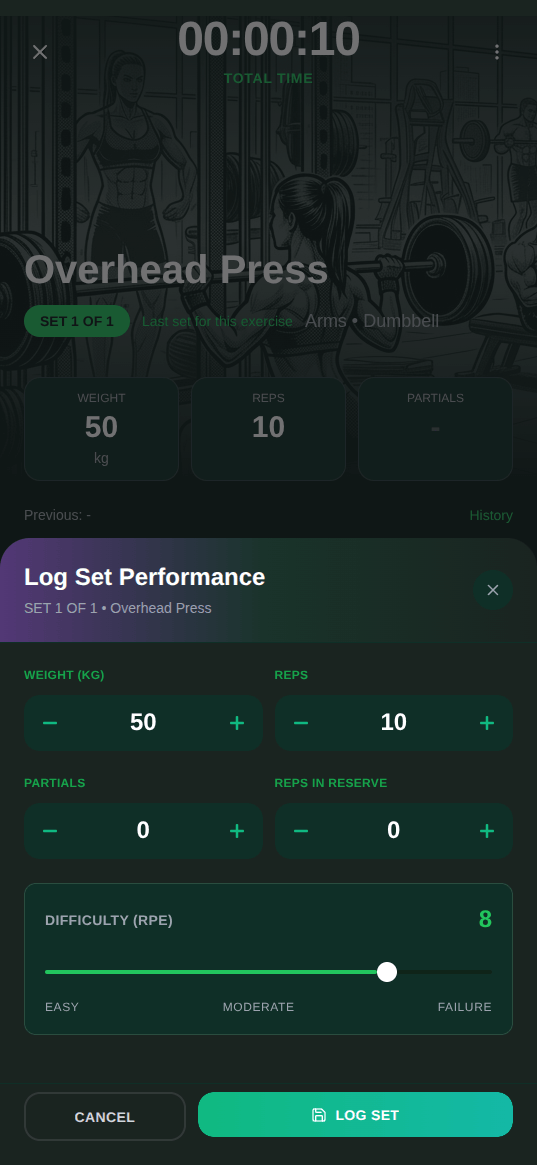
I iterated for a full weekend and landed on what Stitch calls it the “Kinetic Depth” design system. Deep greens for the surfaces (swampGreen #0a1f1a for the background, charcoalGreen #141a17 for cards, gunmetalGreen #1a2420 for elevated elements). Indigo-to-emerald gradients for primary actions and progress indicators. Large, clear numbers for the things that actually matter: weight lifted, reps completed, calories in.
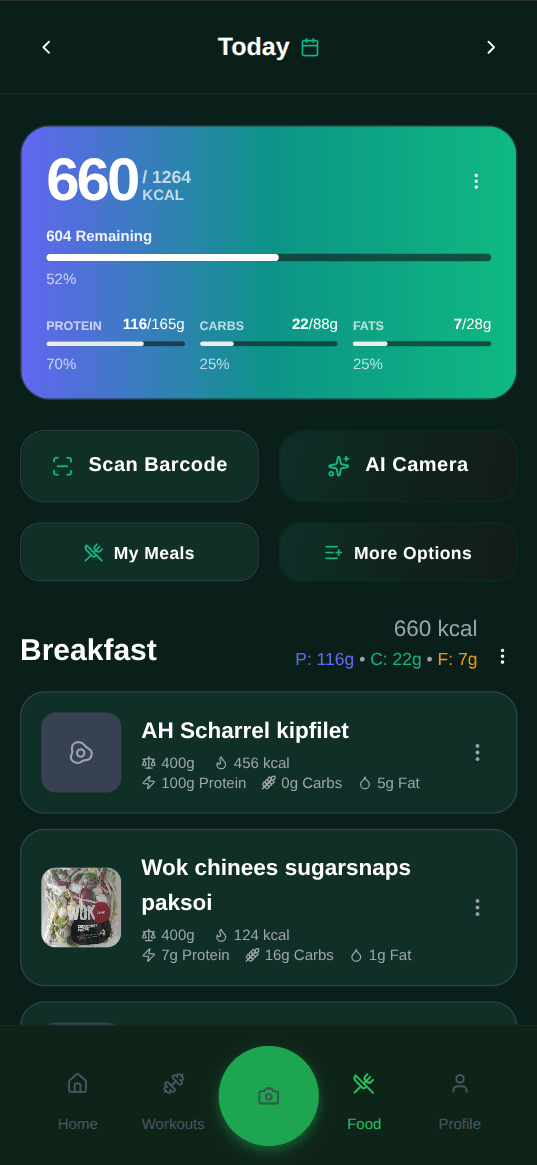
The unexpected part was how much this process forced me to think clearly about the product itself. To generate a good screen in Stitch, I had to articulate what that screen was for before I could describe what it should look like. That process exposed UX problems that had nothing to do with colors. One step in the workout logging flow existed purely because of a technical limitation I had worked around with UI instead of fixing the actual problem. Fixed. Pretended it never happened. Fixed, then refactored the underlying service so it could never come back.
I Stitch also wrote a proper design document for the first time in this project’s life: surface colors with names, semantic colors for macros (protein is always indigo #6366f1, fat is always amber #f59e0b, carbs are emerald #10b981, fiber is pink #ec4899), spacing scale at 4/8/12/16/20/24/32px, border radius standards at 12px for inputs and 16px for primary cards. Things I should have defined before writing a single line of UI code. The “just ship it” bill arrived, as it always does, with interest.
The architecture nobody asked about
Since I was already burning the UI down to the studs, I took the opportunity to tighten the underlying architecture too. This is the part where most people’s eyes glaze over, but if you’re building something with local-first data storage in React Native, some of these decisions might save you time.
Musclog uses WatermelonDB for local storage. Not raw SQLite, not MMKV, not AsyncStorage. WatermelonDB sits on top of SQLite on native and LokiJS on web, and it gives you a model layer with reactive queries. When data changes, any component observing that query re-renders automatically. No manual state sync. No “did I remember to refresh the list after saving?” bugs. The same codebase runs on Android and in the browser without touching the data layer, which matters when you want to test something quickly without spinning up a device.
The layered structure goes: schema definition at the bottom, then models, then services that handle CRUD and business logic. Non-database services (AI, notifications, Health Connect sync) live separately in their own services/ dir. Every write goes through database.write(async () => { ... }). No exceptions. Nested write blocks cause deadlocks in WatermelonDB, and they’re a pain to debug, so the rule is simple: never nest them, and if you find yourself wanting to, you’ve designed something wrong upstream.
Here’s what that looks like in NutritionCheckinService.ts when creating a batch of weekly check-ins:
static async createBatch(
    nutritionGoalId: string,
    checkins: NutritionCheckinInput[]
): Promise<NutritionCheckin[]> {
    return await database.write(async () => {
        const collection = database.get<NutritionCheckin>('nutrition_checkins');

        const preparedRecords = checkins.map((data) =>
            collection.prepareCreate((record) => {
                record.nutritionGoalId = nutritionGoalId;
                record.checkinDate = data.checkinDate;
                record.targetWeight = data.targetWeight;
                record.status = data.status ?? 'pending';
            })
        );

        await database.batch(...preparedRecords);
        return preparedRecords;
    });
}
The prepareCreate + database.batch() combo is how WatermelonDB handles multiple inserts atomically without multiple round trips. One write() block, one batch, done. You never call another service’s database.write() from inside here, because that’s how you get a deadlock at 11pm that somehow only reproduces on device.
Sensitive data, specifically your weight history, body fat percentages, and nutrition logs, gets AES-encrypted before it hits the database. Not because I’m expecting someone to hack a local SQLite file, but because this is health data. It deserves to be treated accordingly. The encryptionHelpers.ts file handles encrypt/decrypt transparently through the service layer. You never think about it as a user. You never have to think about it as a contributor either, because it’s in one place and everything routes through it.
So when you log a meal, here’s what actually gets stored:
// database/encryptionHelpers.ts
export async function encryptNutritionLogSnapshot(plain: {
    loggedFoodName?: string;
    loggedCalories: number;
    loggedProtein: number;
    loggedCarbs: number;
    loggedFat: number;
    loggedFiber: number;
    loggedMicros?: Record<string, number | undefined>;
}) {
    const [
        loggedFoodName,
        loggedCalories,
        loggedProtein,
        loggedCarbs,
        loggedFat,
        loggedFiber,
        loggedMicrosJson,
    ] = await Promise.all([
        encryptOptionalString(plain.loggedFoodName),
        encryptNumber(plain.loggedCalories),
        encryptNumber(plain.loggedProtein),
        encryptNumber(plain.loggedCarbs),
        encryptNumber(plain.loggedFat),
        encryptNumber(plain.loggedFiber),
        encryptJson(plain.loggedMicros),
    ]);

    return { loggedFoodName, loggedCalories, loggedProtein, loggedCarbs, loggedFat, loggedFiber, loggedMicrosJson };
}
That loggedCalories: 165 you typed in? It’s an AES-encrypted string in the database. loggedFoodName: "Chicken breast" is also encrypted. Even the micronutrients JSON blob is encrypted. Everything decrypts at read time through the service layer. The encryption key itself is derived per device and never leaves it.
The chart system has its own quirk worth mentioning. Musclog uses Victory Native for charts on mobile, which uses Skia for rendering. Skia doesn’t work on web. So every chart component has a .web.tsx counterpart using regular Victory with SVG instead. The Expo bundler picks the right file automatically based on the extension. It sounds like double the work and it kind of is, but the alternative is charts that silently break on web, and I use the web version a lot during development.
The same LineChart component, two runtimes:
// components/charts/LineChart.tsx — native (Skia)
import { Area, CartesianChart, Line, Scatter } from 'victory-native';
import Animated, { useAnimatedStyle, useSharedValue } from 'react-native-reanimated';

// components/charts/LineChart.web.tsx — web (SVG)
import { VictoryArea, VictoryAxis, VictoryChart, VictoryLine, VictoryScatter } from 'victory';
Same props interface, same behavior, different rendering backends. The Expo bundler resolves LineChart to the .web.tsx file on web and the .tsx file everywhere else. Zero conditionals in the component that actually uses it.
Volume tracking works the same way at the infrastructure level, except the interesting problem there is the math. Musclog tracks volume as estimated one-rep max, not raw weight x reps, because 5 reps at 80kg and 12 reps at 60kg are different training stimuli that produce the same number on a naive volume chart. The problem is there’s no single accepted 1RM formula. Brzycki, Epley, Lander, Mayhew - they all give you a slightly different number for the same set, and the research doesn’t pick a clear winner. So Musclog runs all seven and averages them:
// utils/workoutCalculator.ts
export function calculateAverage1RM(weight: number, reps: number, rir: number = 0): number {
    const formulas: FormulaType[] = [
        'Epley', 'Brzycki', 'Lander', 'Lombardi', 'Mayhew', 'OConner', 'Wathan',
    ];
    let total1RM = 0;
    let validFormulas = 0;

    formulas.forEach((formula) => {
        const oneRM = calculate1RM(weight, reps, formula, rir);
        if (oneRM !== null) {
            total1RM += oneRM;
            validFormulas++;
        }
    });

    return validFormulas > 0 ? total1RM / validFormulas : 0;
}
The rir parameter is Reps in Reserve: if you stopped at 8 but had 2 more in the tank, rir = 2 adjusts the estimate upward to reflect what you could actually lift. Logging your RIR is optional. The kind of person who built their own fitness app and tracks everything in a spreadsheet is usually also the kind of person who tracks their RIR. I’m not saying it’s me. It’s me.
Wait, what about the actual food data?
Right. The redesign was the visible part of this update. The more significant part, at least from a “is this app actually useful” standpoint, was completely rebuilding how food tracking works.
The original version relied heavily on the nutritional information coming from Health Connect. If you didn’t have another app to do the nutrition tracking, you were left in the dumpster. That’s acceptable for a weekend project. It’s not acceptable for an app people use daily to track calories, protein, carbs, fat, and 40+ micronutrients across multiple meals.
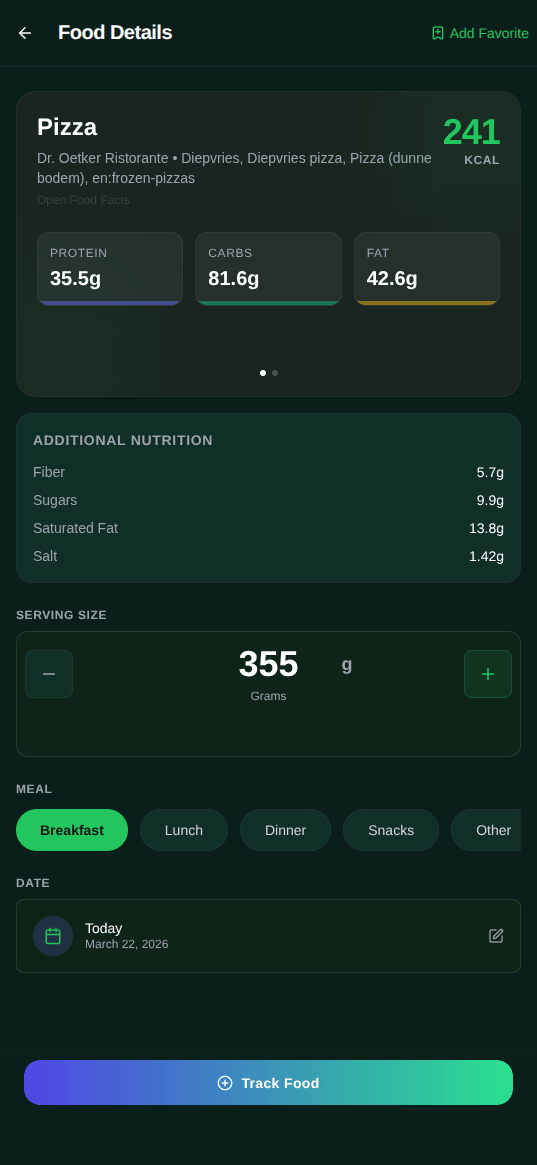
To my genuine surprise, I discovered that high-quality food data doesn’t actually live behind a corporate gatekeeper. There are massive, free public APIs - like the USDA and Open Food Facts - that provide everything from deep micronutrient breakdowns to global barcode lookups without charging a cent. Finding these was a major “aha!” moment: if the data is public and the processing happens right on your device, there is absolutely no technical justification for nutrition tracking to be a subscription-based SaaS. Most “premium” apps are essentially charging you a monthly fee to act as a middleman for data they don’t even own, but that’s a spicy discussion I’ve saved for another time. Musclog now connects to two real food databases.
USDA FoodData Central
USDA FoodData Central is the US Department of Agriculture’s public nutritional database. Hundreds of thousands of foods, from branded products to raw ingredients, with detailed macro and micronutrient breakdowns. It’s government data, it’s free, and the API doesn’t require a credit card, which as you’ll see is a non-trivial consideration for me. Coverage for American and global branded products is genuinely solid. This is the backbone of the search.
The USDA identifies nutrients by numeric codes, so mapping them to something human-readable requires a lookup layer. Here’s what the mapper looks like in practice:
// utils/usdaMapper.ts
export function mapUSDAFoodToUnified(food: USDAFood): UnifiedFoodResult {
    const nutrients = food.foodNutrients;

    // USDA uses nutrient number codes — 1008/208 is energy, 1003/203 is protein, etc.
    const calories = mapUSDANutritient(nutrients, '1008') ?? mapUSDANutritient(nutrients, '208');
    const protein  = mapUSDANutritient(nutrients, '1003') ?? mapUSDANutritient(nutrients, '203');
    const carbs    = mapUSDANutritient(nutrients, '1005') ?? mapUSDANutritient(nutrients, '205');
    const fat      = mapUSDANutritient(nutrients, '1004') ?? mapUSDANutritient(nutrients, '204');
    const fiber    = mapUSDANutritient(nutrients, '1079') ?? mapUSDANutritient(nutrients, '291');

    return {
        id: String(food.fdcId),
        name: food.description,
        brand: food.brandOwner,
        calories: calories !== undefined ? Math.round(calories) : undefined,
        protein, carbs, fat, fiber,
        source: 'usda',
    };
}
The double ?? fallback exists because USDA has two different nutrient numbering schemes depending on the data type (Foundation Foods vs. Branded Foods). Both map to the same output shape.
Open Food Facts
Open Food Facts is a community-driven database of food products from around the world. Think Wikipedia but for nutrition labels: anyone can add a product, the data is open under the ODbL license, and because it’s globally crowdsourced it covers products that the USDA database mostly ignores, like whatever fermented dairy thing is in the Dutch supermarket five minutes from my apartment. When your primary nutrition database assumes you exclusively eat American products and you live in the Netherlands, you start appreciating open global datasets very quickly.
Querying it is refreshingly simple for something this comprehensive:
// hooks/useUnifiedFoodSearch.ts
const url = `https://world.openfoodfacts.org/cgi/search.pl` +
    `?search_terms=${encodeURIComponent(query)}` +
    `&json=1` +
    `&page_size=20` +
    `&fields=code,product_name,brands,nutriments,serving_size,image_url`;

const response = await fetch(url, { signal: abortController.signal });
const result = await response.json();

const products = result.products.filter(
    (product: SearchResultProduct) => getProductName(product)
);
Both searches run in parallel (with abort controllers so stale requests don’t race each other) and the results merge into a single unified list. The user picks from local foods, Open Food Facts results, and USDA results all at once without knowing or caring which backend each came from.
Between the two, you can search for pretty much any food and get real nutritional data without typing anything manually. And because Musclog now tracks over 40 micronutrients beyond the standard macros, you can actually see things like your magnesium intake, your zinc levels, your vitamin D. Turns out this matters once you start looking at what you’re consistently missing. For me it’s magnesium. It’s always magnesium.
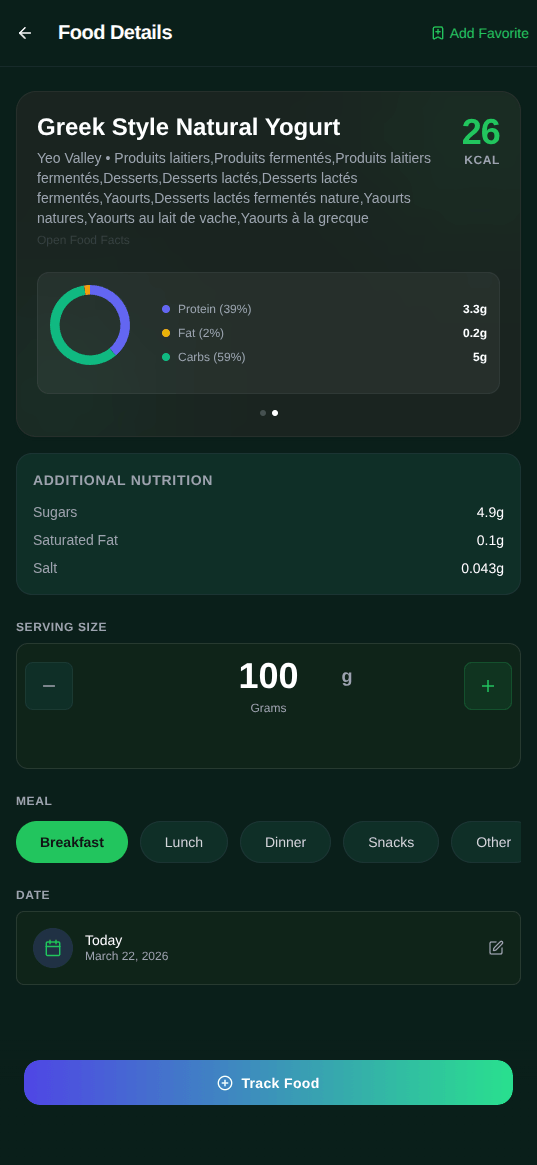
There’s also a barcode scanner. Point your camera at a product, it looks up the barcode in Open Food Facts, adds it to your log. I scan my greek yogurt package every morning entirely out of habit at this point. Frictionless logging is what I wanted when I started this project and I finally have it, two versions and somewhere north of 500 hours later.
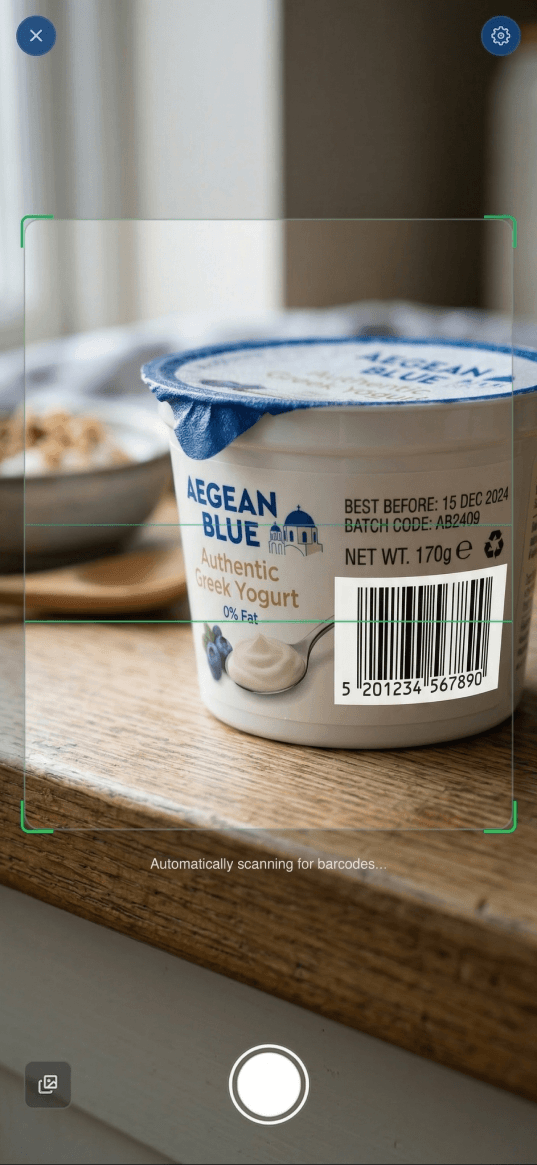
For when you can’t scan anything because you’re eating at a restaurant or staring at a plate of “it’s probably chicken with some sauce,” there’s OCR label scanning (tesseract.js on web, rn-mlkit-ocr on native) and AI-based photo estimation, which I’ll get to in a second.
The OCR follows the same dual-file pattern as the charts. Identical function signature, different engine, bundler picks the right one at build time:
// utils/ocr.ts — native (Google ML Kit, runs on-device)
import { recognizeText } from 'rn-mlkit-ocr';

export async function performOcr(imageUri: string): Promise<string | null> {
    const result = await recognizeText(imageUri);
    const text = result.text.trim();
    return text.length > 0 ? text : null;
}

// utils/ocr.web.ts — web (Tesseract.js, runs entirely in the browser)
import { createWorker } from 'tesseract.js';

const OCR_LANGS = 'eng+spa+por+nld+deu+fra';

export async function performOcr(imageUri: string): Promise<string | null> {
    const worker = await createWorker(OCR_LANGS);
    const { data: { text } } = await worker.recognize(imageUri);
    await worker.terminate();
    return text.trim() || null;
}
ML Kit runs on-device and is fast. Tesseract.js boots and kills a full worker for every scan, which is not elegant, but it works offline and nothing leaves the browser. The language pack covers English, Spanish, Portuguese, Dutch, German, and French. I live in the Netherlands, I’m Brazilian, and I was not shipping a grocery label scanner that choked on Dutch cheese packaging.
The AI coach grew up
The original chatbot was called Chad. Yeah I know, not very creative, but I was focussing more on “shipping” features than making them appealing. And that’s ok, right, Chad?

It’s now called Loggy, it supports both OpenAI and Google Gemini, and it’s actually connected to your data in a meaningful way. When you ask Loggy something, it knows who you are: your recent workouts, your nutrition logs, your weight trends, your current goals. “Was my training volume last week on track?” gets a real answer based on real data, not a generic tip about progressive overload you’ve already read fifteen times.
The structured output layer was one of the more interesting technical problems here. Getting LLMs to reliably output structured data (instead of prose that looks like structured data but breaks your JSON parser) requires care. The makeSchemaStrict utility in utils/coachAI.ts takes any JSON schema and enforces additionalProperties: false on every nested object while marking all fields as required. This goes into the OpenAI function calling config and tells the model “return exactly this shape or fail cleanly.” It makes the difference between a feature that works 95% of the time and one that actually works.
The function itself is simple enough that I almost didn’t write it down:
// utils/coachAI.ts
function makeSchemaStrict(schema: any): any {
    if (schema.type === 'object') {
        const properties = schema.properties ? { ...schema.properties } : {};

        Object.keys(properties).forEach((key) => {
            properties[key] = makeSchemaStrict(properties[key]);
        });

        return {
            ...schema,
            properties,
            additionalProperties: false, // OpenAI requires this for strict mode
        };
    }

    if (schema.type === 'array' && schema.items) {
        return { ...schema, items: makeSchemaStrict(schema.items) };
    }

    return schema;
}
Recursively walks every nested object in the schema and slaps additionalProperties: false on it. Without this, OpenAI’s strict function calling rejects the schema entirely. With it, the model is constrained to exactly the shape you defined. No surprise extra keys. No fields that exist in one response but not another. The AI proposes, the schema enforces.
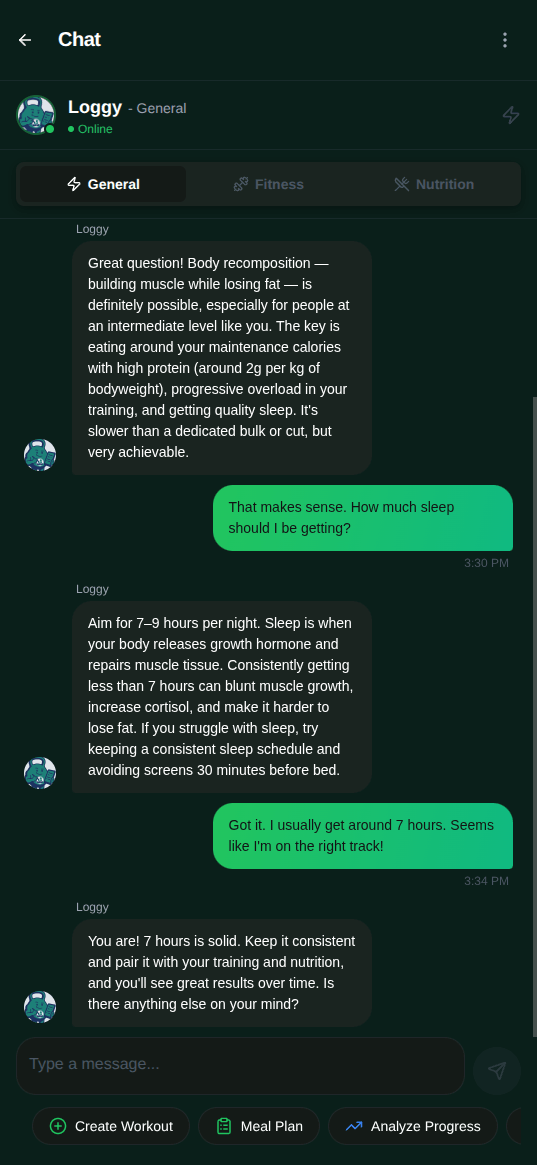
The photo analysis feature is the one that makes new users do a double-take. Take a photo of your meal, Loggy estimates portion sizes and nutritional content. It’s not replacing a food scale for precision tracking, but for eating out or for days when you genuinely can’t scan anything, it gets you in the right ballpark fast. The flow sends the image to the model with a structured schema for the response, extracts the estimates, and then makes you confirm before logging. That last step matters: the AI proposes, you decide.
System prompts live in utils/prompts.ts and pull in custom instructions from the ai_custom_prompts table, so the AI behavior is configurable without touching code.
Weekly check-ins: the feature I’m most proud of
Every week, Musclog runs an automated analysis of your 7-day rolling averages for weight, caloric intake, and activity. You get a status: On Track, Ahead, or Behind. If your numbers are diverging from your targets, it can recalculate your nutrition goals based on what actually happened rather than locking you into a plan that clearly isn’t matching reality.
The core of it is getCheckinMetrics, which takes a check-in record and pulls all the data from the 7-day window ending on that date:
// database/services/NutritionCheckinService.ts
static async getCheckinMetrics(checkin: NutritionCheckin): Promise<CheckinMetrics> {
    const periodEnd = checkin.checkinDate;
    const periodStart = periodEnd - 7 * 24 * 60 * 60 * 1000;

    // Pull all weight measurements for the 7-day window
    const weightMetrics = await database
        .get<UserMetric>('user_metrics')
        .query(
            Q.where('type', 'weight'),
            Q.where('date', Q.between(periodStart, periodEnd)),
            Q.where('deleted_at', Q.eq(null)),
            Q.sortBy('date', Q.asc)
        )
        .fetch();

    // Decrypt each value (weights are AES-encrypted in the DB)
    const decryptedWeights: number[] = [];
    for (const metric of weightMetrics) {
        const { value } = await metric.getDecrypted();
        decryptedWeights.push(value);
    }

    const avgWeight = decryptedWeights.length > 0
        ? decryptedWeights.reduce((a, b) => a + b, 0) / decryptedWeights.length
        : checkin.targetWeight;

    // How far is the actual average from where we expected to be?
    const trend = avgWeight - checkin.targetWeight;

    // Nutrition: group logs by day, calculate average calories and consistency
    const nutritionLogs = await database
        .get<NutritionLog>('nutrition_logs')
        .query(Q.where('date', Q.between(periodStart, periodEnd)), Q.where('deleted_at', Q.eq(null)))
        .fetch();

    const caloriesByDay = new Map<number, number>();
    for (const log of nutritionLogs) {
        const snapshot = await log.getDecryptedSnapshot();
        const dayKey = Math.floor(log.date / (24 * 60 * 60 * 1000));
        caloriesByDay.set(dayKey, (caloriesByDay.get(dayKey) ?? 0) + snapshot.loggedCalories);
    }

    const consistency = Math.round((caloriesByDay.size / 7) * 100); // % of days with logs
    // ...and so on for workouts, body fat, active minutes
}
The trend is the key number: positive means you’re heavier than the target predicted, negative means you’re ahead. Combined with consistency (what percentage of the 7 days you actually logged food), the service can infer whether the variance is real or just missing data.
The TDEE calculation is empirical rather than formula-based. Musclog looks at your actual weight change over time combined with your actual logged calorie intake and works backwards to estimate your real maintenance calories. If you’ve been eating 2,200 calories a day and losing 0.3kg per week, the math tells you something about your actual metabolism that the Harris-Benedict formula never will, especially if your activity level doesn’t fit neatly into “sedentary” or “moderately active” or whatever vague category you picked during onboarding.
The function that does this lives in utils/nutritionCalculator.ts. The logic is straightforward; the constants are not:
// utils/nutritionCalculator.ts
export const calculateTDEE = (params: TDEEParams): number => {
    const { totalCalories, totalDays, initialWeight, finalWeight,
            initialFatPercentage, finalFatPercentage, bmr, activityLevel } = params;

    // Path 1: real tracking data exists — derive TDEE from the First Law of Thermodynamics
    if (totalDays && totalCalories && initialWeight && finalWeight) {
        const weightDifference = finalWeight - initialWeight;

        // Split weight change into fat vs lean mass.
        // Exact when we have body fat % on both ends; Hall/Forbes curve estimate otherwise.
        let fatDifference: number;
        let leanDifference: number;

        if (initialFatPercentage !== undefined && finalFatPercentage !== undefined) {
            const initialFatMass = (initialFatPercentage * initialWeight) / 100;
            const finalFatMass = (finalFatPercentage * finalWeight) / 100;
            fatDifference = finalFatMass - initialFatMass;
            leanDifference = weightDifference - fatDifference;
        } else {
            const comp = getWeightChangeComposition(initialWeight * 0.25, weightDifference);
            fatDifference = comp.fatChangeKg;
            leanDifference = comp.leanChangeKg;
        }

        // Building vs burning fat and muscle have different thermodynamic costs.
        // These are not interchangeable constants — they're separate measured values.
        const leanCalories = leanDifference > 0
            ? leanDifference * CALORIES_BUILD_KG_MUSCLE   // 3900 kcal/kg to build
            : leanDifference * CALORIES_STORED_KG_MUSCLE; // 1250 kcal/kg stored

        const fatCalories = fatDifference > 0
            ? fatDifference * CALORIES_BUILD_KG_FAT   // 8840 kcal/kg to build
            : fatDifference * CALORIES_STORED_KG_FAT; // 7730 kcal/kg stored

        // TDEE = (energy consumed − energy locked in tissue changes) / days
        return Math.round((totalCalories - (fatCalories + leanCalories)) / totalDays);
    }

    // Path 2: no history yet — fall back to BMR x activity multiplier
    if (bmr && activityLevel) {
        return Math.round(bmr * ACTIVITY_MULTIPLIERS[activityLevel]);
    }

    return 0;
};
The asymmetry between building fat (8840 kcal/kg) and burning it (7730 kcal/kg) is real. Thermodynamic efficiency isn’t 100%, so creating new tissue costs more than what ends up stored. Same principle applies to muscle. If you just hardcode 7700 and move on you get something that’s approximately right, but you’re averaging away the exact signal you built the whole check-in system to find.
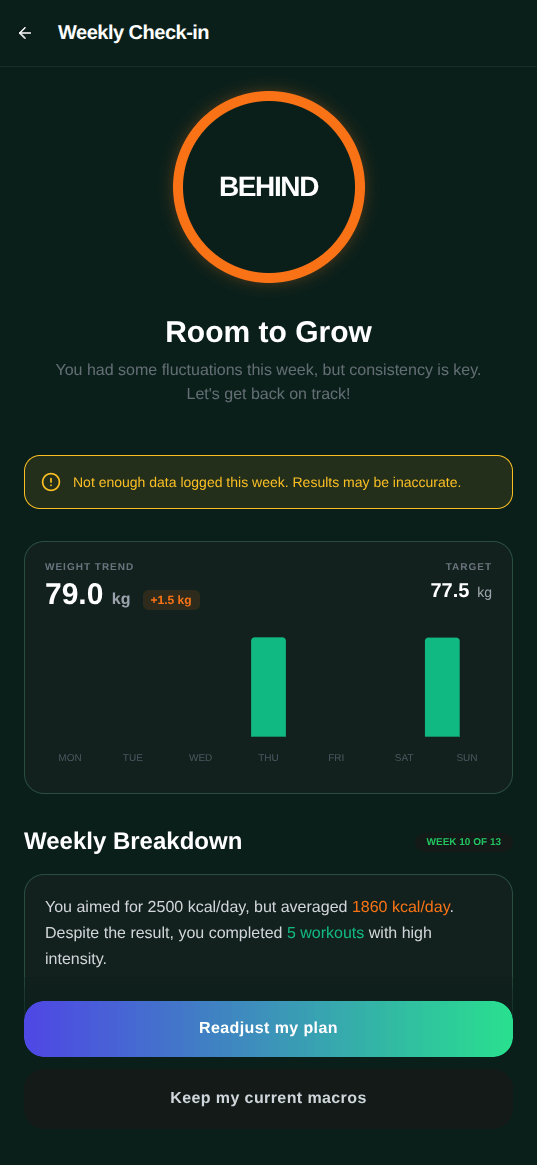
This is not a flashy feature. You don’t notice it until the end of the week. But having an app that notices “you’ve been under your calorie target all week and your weight still hasn’t moved, let’s figure out why” is exactly the kind of insight I was building toward when I started this project. I just didn’t know it at the time. I thought I was building a workout logger.
The other stuff I quietly shipped
Home screen widgets for quick logging and daily summaries. A menstrual cycle tracker with workout intensity recommendations by phase, because assuming a male-only user base is a reasonable starting point not ok so Musclog do not use gender to infer menstrual cycle data. Health Connect integration for syncing weight, nutrition, and exercise data with other Android health apps. Full data export as encrypted (or unencrypted) JSON. Import from JSON for moving between devices without losing your history.
The export feature sounds boring until your phone dies, and you don’t have it. At that point you’re simultaneously grateful you built it and slightly furious at past-you for not testing the import path more thoroughly. Ask me how I know.
Why your fitness app subscription is someone else’s problem
I want to say something about the fitness app market, because I have been holding this in for roughly two years and this is my blog.
The story repeats on a schedule you can set your watch to: app launches free, gets users, introduces a premium tier, gradually migrates core features behind the paywall, raises prices, users complain on Reddit, nothing changes. I’ve watched this happen to apps I genuinely liked using. MyFitnessPal went from actually good and free to a subscription where setting your own macro targets costs money. Other apps introduced “premium food databases” that took away the useful thing and sold it back monthly. One app I used for a while moved the progress charts behind a paywall. The progress charts. In a fitness tracking app. The one feature that shows whether the app is even working.
“But without subscription revenue, how do you keep the lights on?” The lights are a charging cable and cost zero per month. Next question.
I understand the economics. Servers cost money. Engineering teams cost money. Building a sustainable product business is genuinely hard and someone has to pay for it. Fine.
But Musclog doesn’t have servers. There’s no cloud infrastructure. No database I’m paying to host somewhere. Your data lives on your phone. The food databases I use are public and free. The AI features, if you use them, talk directly to OpenAI or Google using your own API key: you pay them, no middleman, no cut. The app is free on Google Play and open source on GitHub.
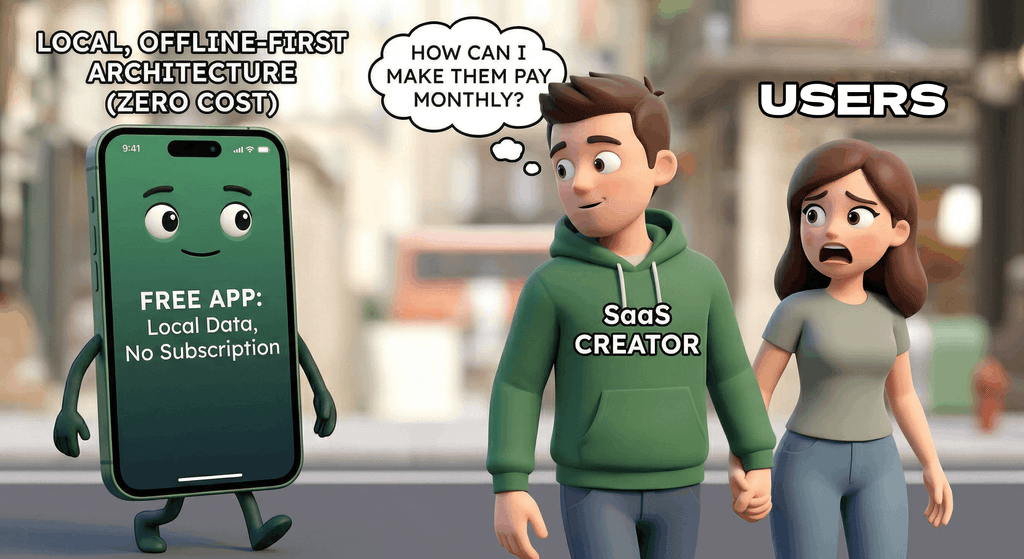
This isn’t a principled stand against capitalism. It’s a design decision that makes sense for what this actually is: a personal tool I built for myself and then shared with other people. The architecture I chose naturally creates no server costs, which means I have no financial pressure to monetize, which means users have no reason to be suspicious about what I’m doing with their data. Because I’m not doing anything with their data. It’s on their phone.
The offline-first design is deliberate for the same reason. Weight history, body composition, what you eat, your menstrual cycle, your workout history: none of this should live on a stranger’s server by default. Most fitness apps don’t explain clearly what they do with that data because a transparent answer would be unpopular. Musclog keeps everything local. The only data that ever leaves your device is what you explicitly send to the AI, and only when you choose to use that feature.
There’s a whole population of people training in gyms with patchy WiFi, in basements, in garages, in parks, who have never once had Musclog fail because it needed to call home. That matters to me more than a monthly recurring revenue number.
What’s next
Onboarding is the weakest part of the app right now. Musclog is significantly more useful the more data it has, but the new user experience is still too close to “here’s the entire app, figure it out.” I want to build a proper onboarding flow that gets someone set up with their goals, their first workout template, and their first food log in under five minutes. You shouldn’t need 500 hours of context to get value from day one.
BLE device support for smart scales is also on the list. Manually entering weight and body fat every day is fine. Having the scale send it to the app automatically when you step on it is better, and the infrastructure isn’t that complex. It’s mostly a matter of getting my hands on hardware to test against, which is a very solvable problem and definitely something I’ll do as soon as I finish the seventeen other things I’ve already started.
Will it be free forever?
Fair question. The short answer is: I have no idea. The longer answer is more interesting.
The code is open source under Attribution-NonCommercial-NoDerivatives 4.0 International. You can read it, fork it for personal use, learn from it. You just can’t ship a product built on it without talking to me first, because Musclog is a proprietary brand that I own, and because the five hundred hours of work behind it represent something north of €25000 in European software engineering salaries. I’m not running a charity. I’m running a side project that hasn’t asked you for money yet.
If that ever changes, here’s my promise: I won’t do the subscription thing. If Musclog ever costs money, it’ll cost money once. You pay the price of a coffee, the app is yours, forever. No recurring fees. No “your premium plan has been paused.” The good old model, the one the App Store basically killed.
The thing pushing me closest to that scenario right now is iOS. My girlfriend wants it on iPhone. Some close friends want it on iPhone. I’ve been hearing “just put it on the App Store” for months as if it’s a trivial thing. The Apple developer program costs 100 USD a year. Per year. Not once. Every year. Apple built a SaaS out of the right to distribute software, and I say this as someone who thinks Google Play’s one-time 35 USD fee is how it should work everywhere. So yes, if Musclog ever lands on iOS, it’ll probably have a price tag, because I am not paying a 100 USD annual toll to Apple out of goodwill.
For now: Android, free, no plans to change that. So grab it while it’s free, because once you download it on Google Play, it’s yours forever. Even if you didn’t pay for it. Especially if you didn’t pay for it.
Conclusion
Two years, two versions, 500 hours. Musclog finally looks like something I don’t mentally apologize for before showing to someone. The redesign cleared years of “just ship it” UI debt, and doing it properly forced me to think about the product in ways I should have been thinking about since the beginning. Turns out design systems exist for good reasons and not just to give designers something to talk about in Figma.
It’s free. It’s open source. It doesn’t have your data. It works in airplane mode. Real food databases. AI that actually knows who you are. Automated weekly check-ins. And a dark green color scheme I’m genuinely proud of, even if an AI tool did most of the visual heavy lifting.
If you want to try it: Google Play.
If you want to see how it’s built or contribute something: github.com/blopa/musclog-app.
Lift, Log, Repeat.
See you in the next one!
Tags:
- react
- react native
- expo
- android
- fitness
- musclog
- nutrition
- usda
- open food facts
- stitch
- design
- offline
- watermelondb
- nativewind
Related posts
Post a comment
Comments
No comments yet.